
The alarm that makes you get out of bed: an honest roundup
Clocky, Ruggie, wake-up lights and mission apps, judged on two questions: can you cheat it half-asleep, and does it survive silent mode? An honest roundup.
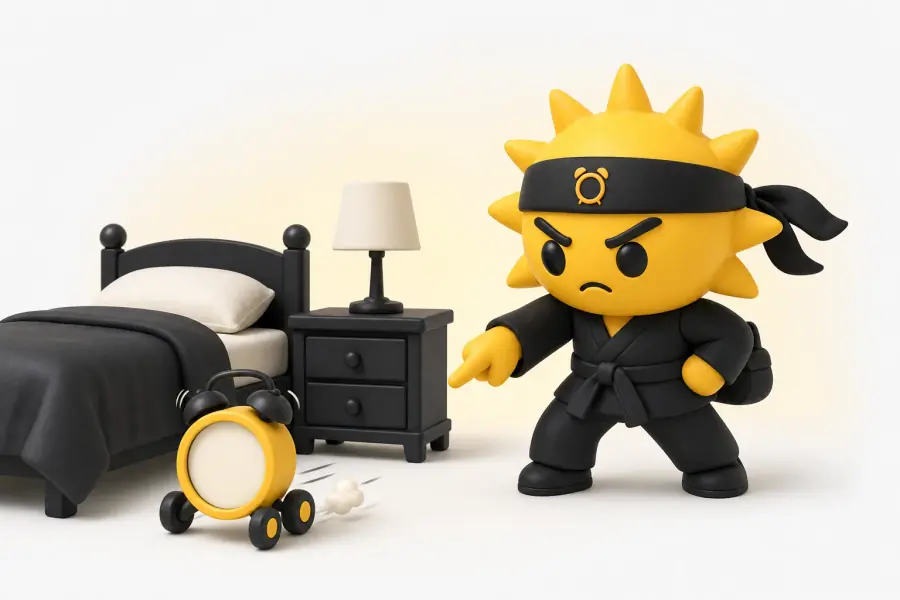
The short answer
An alarm only gets you out of bed if switching it off requires you to be vertical and somewhere else: a mission app whose target object lives in another room, or a pressure mat you have to stand on. The gap this closes is measured: snoozers took 26.93 minutes between first alarm and getting up, against 8.48 minutes for everyone else (Mattingly et al., SLEEP, 2022), and every product below is buying back some of those eighteen minutes.
An alarm that makes you get out of bed works one of two ways: it physically escapes (Clocky rolls off the nightstand, Ruggie demands your full body weight on a mat), or it holds the noise hostage until you complete a task, the way mission apps like Risly and Alarmy make you scan an object or solve math across the room. Everything in this roundup does one or the other.
Full disclosure: we make Risly, one of the apps below. So this list is built on two questions we cannot fake the answers to, because you can check both yourself in one morning: can you defeat it half-asleep, and does it ring at all on the morning it matters?
Which alarm actually gets you out of bed?
If you own an iPhone on iOS 26, a mission app with the target object in another room (Risly, 3-day free trial then a subscription (see the App Store for available plans, local prices and trial eligibility)) is the only one on this list you cannot beat lying down; if you want a one-time purchase or you are on Android, Ruggie (~$99) is the strongest gadget, because standing up is exactly the behaviour you are trying to force. Everything below is the working-out.
| Risly | Ruggie | Clocky | Wake-up light | |
|---|---|---|---|---|
| How it gets you up | Mission across the room | You stand on a mat | Rolls away, you chase it | It does not, just gentle light |
| Beatable half-asleep? (our verdict, not a measurement) | Scan needs the real object; math and push-ups take real time | Hand-press, or stand and flop back | Corner-traps itself; pre-placement kills it | Off switch in reach |
| Rings on silent / Focus | Yes (AlarmKit system alarm) | Yes (own speaker) | Yes (own speaker) | Yes (own speaker) |
| Fails when | You are on Android or pre-iOS 26 | You learn the hand trick | Batteries die, room has corners | You need force, not comfort |
| Price (indicative, US) | 3-day free trial, then a subscription (see the App Store for available plans, local prices and trial eligibility) | ~$99 one-time | ~$40 one-time | $50–$200 one-time |
| Best for | People who are chronically late | One-room sleepers | Kids, gift-buyers | Groggy-but-punctual people |
Which of these can you defeat half-asleep?
All of them, if you are determined. The real question is whether the 6:40am version of you can do it without standing up. That version is not short of willpower, it is short of a working prefrontal cortex: for 15 to 60 minutes after waking (Hilditch & McHill, Nature and Science of Sleep, 2019) judgement runs degraded while the motor system runs fine, which is precisely the combination that lets someone silence an alarm and remember nothing about it.
So the ranking above is a ranking of reach. A snooze button loses instantly. Anything on the nightstand loses within a week. A mat beside the bed survives until you discover you can press it with a hand. A clock on wheels survives until it corners itself. An object in the kitchen survives because there is no version of you that reaches the kitchen and then successfully argues its way back under the duvet.
And note what is missing from this list: "a louder alarm". Volume is a different problem with its own page, the loudest alarm sound on iPhone, and past a point it buys nothing, because a hundred-decibel alarm is dismissed with the same half-second swipe as a sixty-decibel one.
It is worth saying what none of this is about. Buying one of these will not repair your brain, and the cited experiment does not establish long-term brain-health effects: a sleep lab put 31 habitual snoozers under polysomnography for the Journal of Sleep Research in 2024 and found half an hour of snoozing cost around six minutes of sleep, with no measurable cognitive impairment that morning. The cost is the eighteen minutes Mattingly measured between the first alarm and standing up. In other words, the cost is your schedule, and that is exactly what a physical obstacle is good at.
The mission apps
Mission apps flip the mechanism: instead of moving the alarm away from you, they move the off switch to the other side of a task. Alarmy popularised it (photograph the bathroom sink, scan a barcode in the kitchen), and its mission library is the deepest on the market. Two caveats from years of user reviews: photo missions get cheated with a screenshot kept on the nightstand, and on iPhone, Alarmy’s own support doc asks you to turn silent mode off, never force-quit the app, and add Alarmy to the allowed apps inside Do Not Disturb and each Focus. That is the second question, answered in writing.

Risly
For people who are chronically late and own an iPhone on iOS 26: the off switch lives in another room.
- No snooze button anywhere: not hidden in settings, not behind a long-press
- Built on AlarmKit, so it rings through silent mode and survives a force-quit, like the system Clock app
- Nine missions (object scan, QR, barcode, push-ups, math, memory, drawing, kiss and shake), with the object, code and push-up recognition running on-device
- The scan target is yours to choose, so you decide how far from the bed the off switch sits
- Requires iOS 26 or later, and there is no Android version
- No sleep tracking, no sleep sounds, no gentle wake
- A subscription, where the gadgets here are one-time purchases
There is no snooze button anywhere in Risly. The alarm stops when you finish a mission: scan an object you registered across the room, solve chained math problems, shake the phone, or do push-ups counted by the front camera. On the object, code and push-up missions the recognition runs on the phone itself, and those frames only leave it if you switch on Morning Memories, an off-by-default setting whose whole purpose is to keep those shots for you. Where it loses: iOS 26 or later, no Android, and it is aggressive on purpose. If you want to be woken kindly, buy the sunrise lamp and skip us entirely.
The gadgets: Ruggie, Clocky and wake-up lights
Ruggie: the alarm you stand on
Ruggie
For people in one room, or on Android, who want a one-time purchase and no phone involved.
- The mechanism is the exact behaviour you want: standing up, with your full weight, for a set number of seconds
- Its own speaker, so no Focus, silent switch or software update can mute it
- Duration is adjustable, so you can make the stand long enough to be genuinely awake by the end
- Works regardless of which phone you own, or whether you own one
- Beaten by pressing it with a hand, or standing on it and folding straight back into bed
- It measures pressure, not wakefulness; nothing checks that your eyes are open
- The priciest item here, for a single-purpose object
- It only works if it lives beside the bed, which caps how much distance it can buy
Ruggie is a pressure-sensing mat you put beside the bed, and the alarm only stops after you stand on it with your full weight for a few seconds. This is the best pure mechanism on the gadget side. The cheat is obvious once you own one, and every owner finds it: it measures pressure, not wakefulness.
Clocky: the clock on wheels
Clocky
For gift-buyers, and for kids who will find the chase funny enough to keep playing along.
- You genuinely cannot catch it from bed, which is the whole test
- Its own speaker, so nothing on your phone can silence it
- The cheapest thing here that forces real movement
- Around since 2005, so it is a known quantity rather than a crowdfunding promise
- Bedrooms have corners, and it finds them; a wedged Clocky is just a loud clock you can reach
- Runs on AAA batteries, and a dead Clocky wakes nobody
- Easy to defeat by placing it where it cannot escape, which most owners eventually do
- It is loud and chaotic, which is a poor fit if someone else sleeps in the room
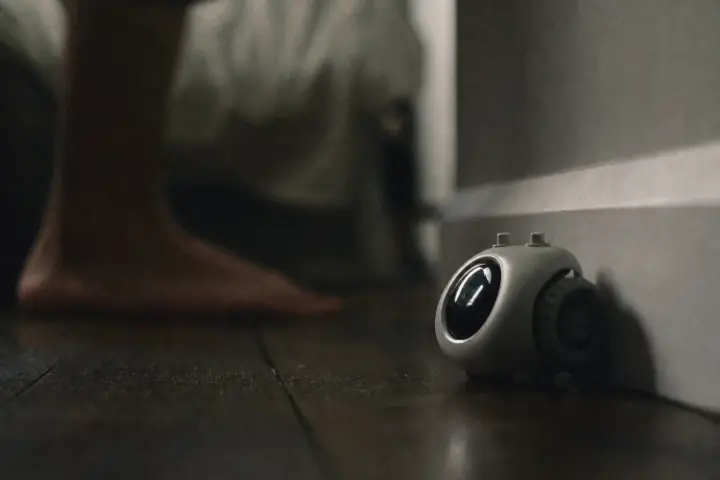
Clocky rings once, then drives off the nightstand and wanders the room beeping until you catch it. As theatre it is great. As a system it has a flaw the marketing photos never show, and the photo below is it.
Wake-up lights: the wrong tool, honestly labelled
Wake-up light (Philips SmartSleep and similar)
For people who wake up groggy but do get up: this softens the morning, it does not enforce it.
- Brightens gradually for around half an hour, so you surface from sleep rather than being yanked out of it
- The people who use one tend to keep using it for years, which is rare in this category
- Its own speaker and no dependence on your phone at all
- The only item here that also improves the evening, since most double as a reading lamp
- It does not make you get out of bed, and it is not sold as if it did
- Every model has a snooze button or an off switch within arm’s reach
- Useless if you sleep in a room where the light cannot reach your face
- The most expensive way to fail the only test on this page
Sunrise lamps brighten gradually before your alarm time, and people who use them tend to love them. Be clear about what they are: a gentle-wake tool, not a get-out-of-bed tool. If your problem is grogginess, buy one. If your problem is that you turn alarms off and go back to sleep, a lamp will lose that fight silently, in soft pink.
One illustrative case, invented for this article rather than drawn from any study: Ravi, 31, in Leeds, bought a Clocky, loved it for a fortnight, then started leaving it on the windowsill because it kept getting stuck behind the radiator. On the windowsill it never moves, which means it is now a normal alarm with wheels. The gadget did not fail him. The placement did, and placement is the decision he was making at 11pm while genuinely awake.
Do the gadgets or the apps survive silent mode?
The gadgets pass by default: their own speaker, no software between you and the bell. Apps are where this used to get ugly. Before iOS 26, a third-party alarm on iPhone was a local notification wearing a costume, and silent mode or a force-quit could kill it. Apple’s own support page on setting alarms states plainly that Do Not Disturb, the Ring/Silent switch and Silent mode do not affect the alarm sound. AlarmKit, shipped in iOS 26, finally lets an app schedule that same kind of alarm. Note that Apple’s page does not mention Focus by name; that a Focus behaves the same way is our reading, backed by our own testing rather than by a documented line.
So pick by failure mode. If you sleep through noise entirely, start with the heavy sleeper playbook. If you wake up fine but negotiate your way back under the covers, you need a task, not a sound, and the habit-side tactics in how to stop hitting snooze stack on top of any purchase you make.
Alarms that get you out of bed: common questions
What is the alarm clock that runs away from you?
Clocky, made by Nanda Home since 2005. It rings once, then rolls off the nightstand and drives around the room beeping until you get up and catch it. It works until it wedges itself into a corner, or until you start placing it where it cannot escape.
What alarm makes you physically get out of bed?
Two designs do it reliably: a pressure mat like Ruggie, which needs your full body weight for a set number of seconds, and a mission app whose target object lives in another room, so completing the task and staying in bed are mutually exclusive. Everything else relies on you choosing to stand up.
Clocky or Ruggie: which one actually works?
Ruggie, for most people. Standing up is the behaviour you are trying to force, so the mat measures the right thing, where Clocky measures whether you can catch it, a game that ends the first time it corners itself. Clocky is cheaper and far funnier, which is why it makes a better gift than a system. That comparison is our judgement from the mechanisms, not a tested result.
Do wake-up lights actually get you out of bed?
No, and they are not sold as if they do. A sunrise lamp eases the transition out of sleep and can make the first ten minutes far less unpleasant, but nothing about a warm glow forces you upright and the off switch is always within reach. Pair one with something that demands movement if you need both.
Can you cheat these alarms?
The gadgets, easily: Clocky by placing it where it cannot escape, Ruggie by pressing it with a hand or standing on it and folding straight back into bed. The app side has its own answer, which we set out in the camera-mission page.
Is there a free way to make yourself get out of bed?
Yes, and it is worth trying before you spend anything: put the phone across the room, use the built-in Clock app with snooze turned off, and the walk becomes the mission. It costs nothing and works, right up until the night you leave the phone charging by your pillow, which is the failure mode every paid option on this page exists to close.
Research cited
- Mattingly et al. (2022). Snoozing: an examination of a common method of waking. SLEEP
- Hilditch & McHill (2019). Sleep inertia: current insights. Nature and Science of Sleep
- Sundelin et al. (2024). Is snoozing losing? Journal of Sleep Research
- Apple Support: How to set and change alarms on your iPhone (118444)
Keep reading




Ready when you are
Choose your next wake-up mission.