
How to get the loudest alarm sound on your iPhone
Max out iPhone alarm volume in two minutes: the Sounds & Haptics slider, the Attention Aware trap, the harshest built-in tones, and why louder stops working.
The short answer
The loudest iPhone alarm takes two minutes to set: drag the Ringtone and Alerts slider in Settings → Sounds & Haptics to maximum, switch Change with Buttons off so nothing lowers it overnight, and pick a harsh tone like the Classic Alarm bell. If it still rings weak, the usual culprit in our experience is Attention Aware Features ducking the volume when the front camera decides you are looking. Past that fix comes the honest limit: in fire-alarm research, sleepers stayed asleep at 95 dBA at the pillow, so the endgame is not more volume, it is an alarm you cannot dismiss.
Getting the loudest alarm sound on your iPhone starts with a slider you have probably never touched: open Settings → Sounds & Haptics and drag Ringtone and Alerts all the way right: that slider, not the side buttons, is the alarm volume. Then swap your tone for one of the harsh classics like Alarm (under Classic), because a piercing bell at full volume cuts through sleep in a way the soft modern tones never will. The rest of this page is the part other guides skip: the two settings that quietly undo your work, what Apple actually documents about silent mode and AirPods, an honest measurement of the phone-in-a-glass trick, and the research on why "louder" eventually stops being the variable that wakes you at all.
I found the biggest of those settings the hard way, after three mornings of an alarm that sounded like it was ringing under a duvet in another room. Slider maxed, tone harsh, still muffled. The culprit was sitting in Face ID settings, of all places. We will get there.
Where is the iPhone alarm volume setting?
In Settings → Sounds & Haptics, under the slider labelled Ringtone and Alerts. That one slider decides how loud a Clock alarm rings, and Apple’s alarm support page (How to set and change alarms on your iPhone) points there first when an alarm is too quiet. The side volume buttons only touch it if Change with Buttons is enabled on the same screen, which cuts both ways: convenient by day, and a standing invitation for a pocket press or a late-night volume-down to drag tomorrow’s alarm to the floor. One more check from the same Apple page while you are in there: if the alarm only vibrates, its sound is probably set to None; the fix is in Clock → Alarms → Edit → Sound, and it is Apple’s named suspect when the alarm only vibrates.
How do you make the iPhone alarm louder? The full checklist
- Open Settings → Sounds & Haptics and drag the Ringtone and Alerts slider to maximum. This is the alarm volume. The side volume buttons usually change media volume, which does nothing for your alarm.
- On the same screen, turn Change with Buttons off. With it on, a pocket-press or a late-night volume-down while watching videos can silently lower tomorrow’s alarm.
- Go to Settings → Face ID & Passcode, enter your passcode, and turn off Attention Aware Features. Explanation below: this is the trap.
- In the Clock app, edit your alarm → Sound, and check two things: the sound is not set to None, and the tone is a harsh one: Alarm (under Classic), Sencha or Radar. Skip Slow Rise and Silk; they were designed to be pleasant, which is the opposite of your goal.
- If you use a Sleep schedule in the Health app, check its wake-up alarm separately. It carries its own sound and volume settings under Sleep, and maxing out the Clock app does not touch them.
- Charge the phone face-up and uncovered; a phone face-down on a mattress or buried under a pillow loses a real share of its output to the foam. If it docks in StandBy overnight, know Apple’s caveat: "When you use StandBy, haptics for your alarms are disabled." The sound still plays; the buzz does not.
- Leave Date & Time on automatic. Apple warns that manually changing your iPhone’s time can affect your alarms, so do not hand-wind the clock the night before an early start.
The setting that quietly caps your volume: Attention Aware Features
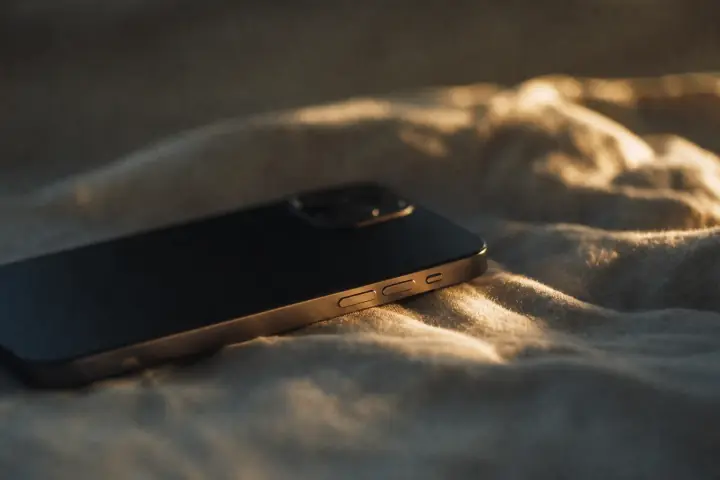
Two honest caveats before you pin every quiet morning on it. On its support page (Turn Attention Aware features on or off) Apple writes alerts, not alarms, and gaze detection does not appear on Apple’s own checklist for a quiet or silent alarm. So label this for what it is: our field diagnosis, not Apple doctrine. Among readers who have already exhausted the official list (slider up, sound not None, iOS current), this toggle is the fix that most often ends the mystery, and the pattern matches its logic exactly: the alarm starts at full blast, you crack one bleary eye toward the screen, the volume collapses mid-ring, and a half-asleep brain files the sudden quiet as permission to drift back under.
Turn it off and the alarm holds its volume until you deal with it; the price is losing the daytime courtesy of quieter pings while you are reading. And if your alarm is not quiet but absent (no sound at all, some mornings), that is a different fault tree with its own checklist: iPhone alarm not going off.
What’s the loudest built-in iPhone alarm sound?
The hardest built-in tones to sleep through are the old-school Alarm bell (Clock → edit alarm → Sound → Classic), Sencha, and the default Radar. Pick any of the three and the choosing is done.
Why no decibel ranking? Because Apple publishes none, and at maximum volume the tones leave the speaker at broadly similar output. What separates them is how they cut: sharp, repetitive patterns are far harder for a sleeping brain to file away as background than a warm ambient loop, which is why Slow Rise, Silk and everything that sounds like a spa belong to people who wake easily, not to anyone reading a page titled "loudest alarm sound". There is a measured version of this point (what wakes sleepers is not the loudest signal but the right kind of signal), and it is waiting in the honest section below.
Will the alarm still ring out loud with AirPods in?
Yes, and this one is documented, not folklore. Apple states that the alarm sounds through your iPhone’s built-in speakers in addition to wired and wireless headphones, so a pair of AirPods you fell asleep wearing cannot swallow the alarm: the phone on the nightstand rings at full volume regardless. Good news for your wake-up, worse news for whoever shares the room. The design intent is obvious: an earbud that fell out at 2am, or a Bluetooth speaker that died overnight, should never take an alarm down with it. The corollary is that the built-in speaker is the whole game, so do not smother it. Face-down on a soft surface can muffle the alarm badly enough to sleep through.
Does the phone-in-a-glass trick make the alarm louder?
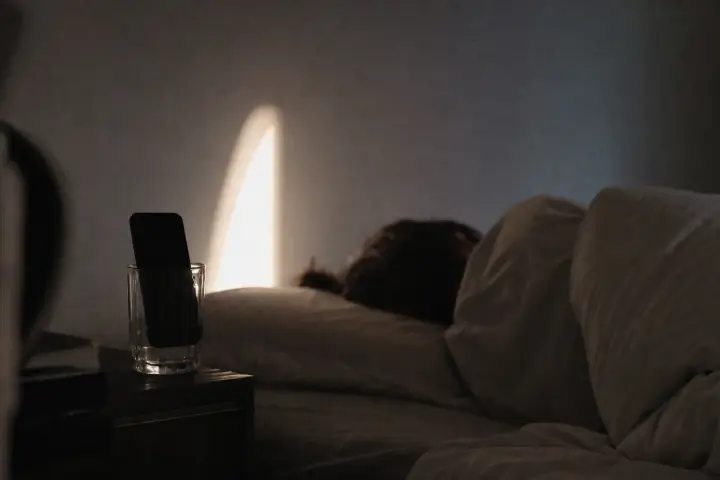
A little, genuinely. An empty glass or ceramic mug works as a passive resonator: it catches the sound firing out of the bottom speaker and reflects it up and out into the room, instead of surrendering it to the duvet. Nobody has published a measurement we would put a number on, so treat the gain as a practical order of magnitude: a few decibels, roughly the difference between a phone smothered face-down and one standing in clear air. Audible, free, and it takes ten seconds.
It is also a bandage on the wrong wound. The glass makes the same predictable tone slightly louder; it does nothing about Attention Aware ducking the volume the moment you glance over, nothing about the half-asleep thumb that kills the alarm in one practised motion, and nothing about a brain that has heard Radar four hundred mornings running and reclassified it as furniture. If a drinking glass has been load-bearing in your mornings, the honest section below is the part you actually came for.
Every setting that touches alarm volume, in one table
| Setting | Where it lives | What to do |
|---|---|---|
| Ringtone and Alerts slider | Settings → Sounds & Haptics | Drag to maximum; this is the real alarm volume |
| Change with Buttons | Settings → Sounds & Haptics | Off, so buttons cannot quietly lower it |
| Attention Aware Features | Settings → Face ID & Passcode | Off: stops iOS ducking alert volume when you glance at the screen |
| Alarm sound | Clock app → edit alarm → Sound | Alarm (Classic), Sencha or Radar; never None, never Slow Rise |
| Sleep schedule alarm | Health app → Sleep | Check separately; it has its own sound and volume |
| Phone placement | Your nightstand | Face-up, uncovered, or standing in a glass for a few extra decibels |
Then test it tonight, not on the morning that matters: set an alarm five minutes out, put the phone where it will actually sleep, and keep your eyes off the screen while it fires. An alarm you have never heard at full volume is a promise, not a plan.
The honest part: past a point, louder does nothing
Here is the measurement the "loudest alarm" listicles never quote. Fire-safety researchers spent a decade on the exact question this page circles (what does it take to wake a sleeping human?), because for them the answer decides who gets out of a burning house. Ian Thomas and Dorothy Bruck summarised that decade in Fire Technology (2010), and two findings matter here: some sleepers slept straight through alarm signals measured at 95 dBA at the pillow, far beyond anything an iPhone speaker will ever produce, and the signal that reliably woke the hardest-to-wake groups was not a louder version of the standard beep but a different one, a 520 Hz square wave, lower and rougher than the high-pitched tones most alarms default to. Wrong signal, more decibels: still asleep.
That is the ceiling on this entire page. The settings above will buy you every decibel your hardware owns, and for most people that genuinely is enough. But the brain is a filtering machine: give it the same tone at the same hour for a few weeks and it reclassifies the loudest alarm sound on your iPhone as background, which is how heavy sleepers end up sleeping through volumes that would empty an office, and how so many people dismiss an alarm with zero memory of doing it. If either of those is your morning, the volume slider was never the problem, and sleeping through your alarm walks the real diagnosis.
Volume also has no vote in what happens after your eyes open. The first minutes of the day run under sleep inertia, the impaired, foggy state that lasts 15 to 60 minutes for most people (Hilditch & McHill, Nature and Science of Sleep, 2019). And when researchers put habitual snoozers under polysomnography, half an hour of snoozing cost about six minutes of sleep with no measurable cognitive impairment (Journal of Sleep Research, 2024). This small experiment does not establish all health effects, and a later rise is not necessarily a missed commitment. A louder alarm just means you silence it faster.
How much sleep is your alarm fighting?
No slider compensates for a sleep debt: a maxed-out alarm against a five-hour night is volume versus physiology, and physiology wins. Add up what you are actually carrying; if the number is ugly, the fix for brutal mornings is at 11pm, not in Sounds & Haptics.
A made-up but typical example, not a study. Rhys, 33, on early shifts at a builders’ merchant in Swansea, ran the full loudness stack: slider maxed, Radar, phone standing in a pint glass, a backup alarm ten minutes later. It worked for two weeks; by the fourth he was sleeping through the glass and dismissing the backup with no memory of it. What finally got him to the 5:40 bus was none of it: he moved the phone across the room, so silencing it required standing up. The decibels were never the bottleneck. The reachable off switch was.
That is the principle Risly is built on. It runs on AlarmKit, Apple’s iOS 26 alarm framework, so it rings like the system Clock app (at full volume, through silent mode and Do Not Disturb) where older alarm apps could be muted by a Focus or killed by a force-quit. And there is no snooze button anywhere in it: the ringing stops only when you finish a mission: scanning the object you picked, across the room, chained math, shaking the phone, or push-ups counted by the front camera, processed entirely on-device. It requires iOS 26 or later, and it is deliberately unpleasant at 6:40am. If you want a gentle wake-up, a sunrise lamp will treat you better; if you want to stop being late, the reasoning is on our anti-snooze page.
Loudest alarm sound on iPhone: common questions
Why is my iPhone alarm so quiet all of a sudden?
Three usual suspects, in order: Attention Aware Features lowering the volume when the front camera decides you are looking at the screen (Apple documents the behaviour for alerts; in our experience it is the fix that most often ends the mystery), Change with Buttons letting a stray press turn alarm volume down, or the Ringtone and Alerts slider sitting low in Settings → Sounds & Haptics. All three take under a minute to check.
Do the volume buttons change alarm volume on iPhone?
Only if Change with Buttons is on in Settings → Sounds & Haptics, and that is exactly why you should turn it off. With it off, alarm volume is fixed by the Ringtone and Alerts slider and nothing you press during the day can lower it.
Does the silent switch lower alarm volume?
No, it has no effect on it at all. Apple states it word for word on its alarm support page: "Do Not Disturb, the Ring/Silent switch, and Silent mode don't affect the alarm sound." If your alarm rang quiet or not at all, the cause is elsewhere; the full fault tree is in iPhone alarm not going off.
What is the loudest default alarm sound on iPhone?
Apple publishes no decibel figures, and at maximum volume the tones leave the speaker at broadly similar output. The hardest ones to sleep through are the classic Alarm bell (Clock app → Sound → Classic), Sencha and Radar, because they are sharp and repetitive. Ambient tones like Slow Rise are far easier for a sleeping brain to ignore.
Does putting your iPhone in a glass make the alarm louder?
A little. An empty glass reflects the bottom speaker’s output upward instead of losing it to soft surfaces; expect a gain of a few decibels, an order-of-magnitude estimate rather than a published measurement. It does nothing about the usual real problems: Attention Aware ducking the volume, or a half-asleep thumb dismissing the alarm outright.
Sources
- Apple Support: How to set and change alarms on your iPhone (volume slider, Change with Buttons, silent mode, headphones, StandBy)
- Apple Support: Turn Attention Aware features on or off
- Thomas & Bruck (2010). a decade of research on waking sleeping people: 95 dBA failures and the 520 Hz square wave. Fire Technology 46(3)
- Hilditch & McHill (2019). Sleep inertia: current insights (15 to 60 minutes of impaired waking). Nature and Science of Sleep
- Sundelin et al. (2024). Is snoozing losing? Journal of Sleep Research
Keep reading



Ready when you are
Choose your next wake-up mission.